Saree prompt
Gemini Saree Prompt for Girls
Free Gemini saree prompt to turn your photo into an elegant traditional saree portrait. Copy paste, upload your photo and get a trending AI edit in seconds.
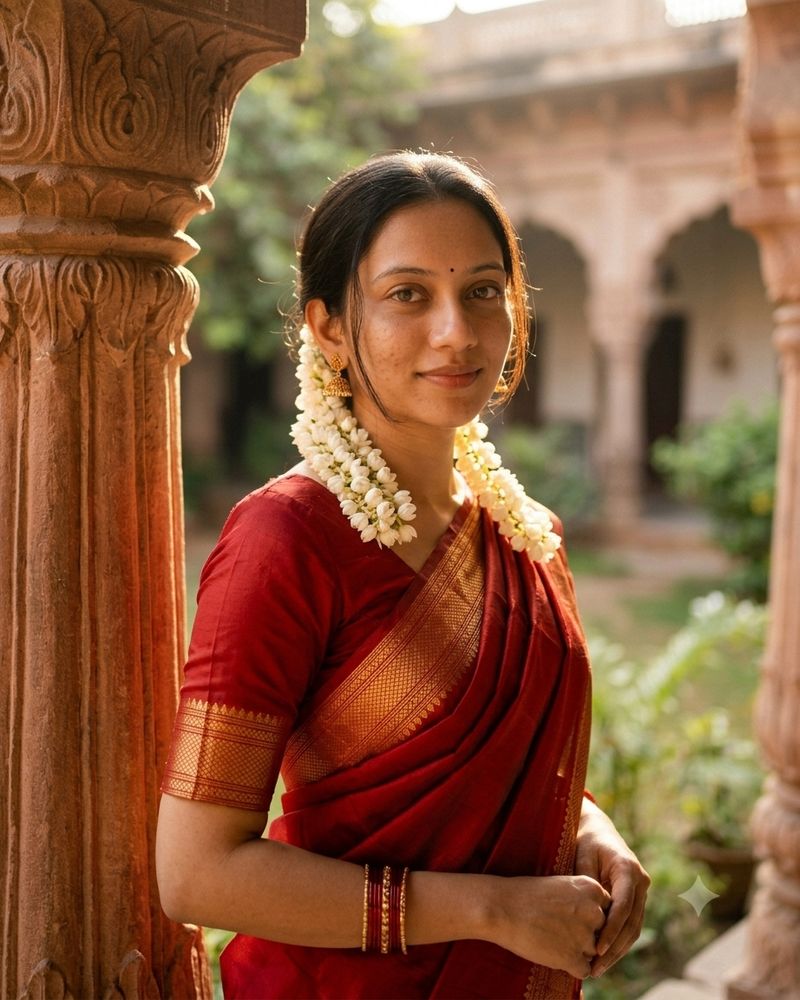
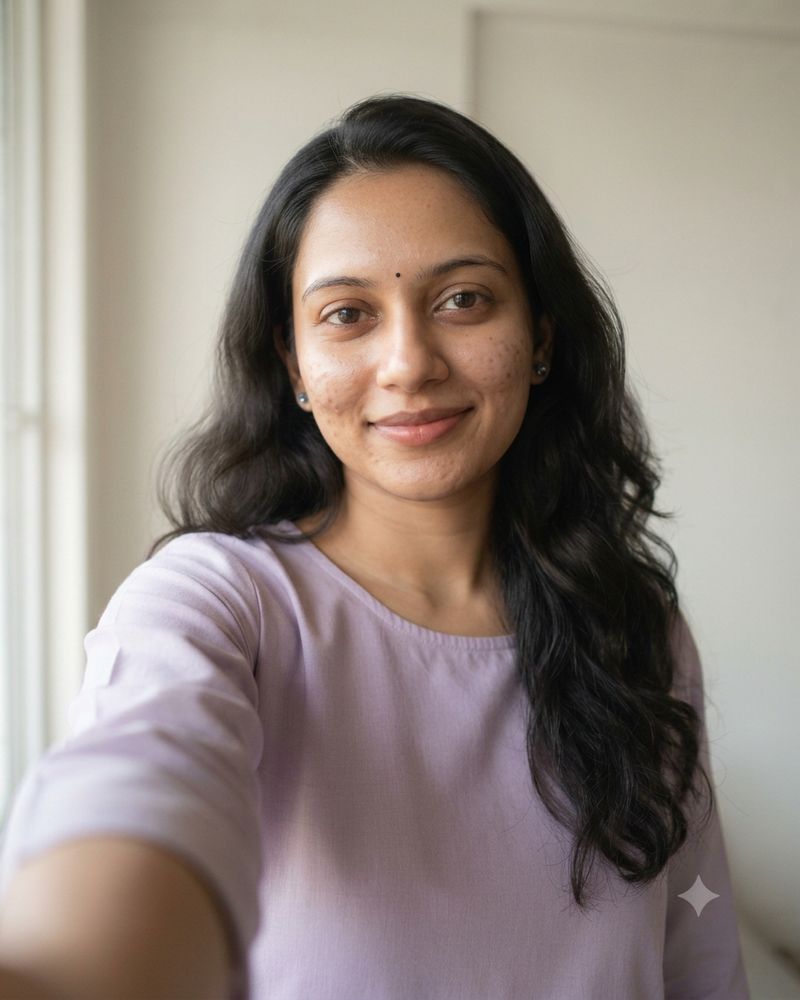
Copy this prompt
Upload your own clear photo in the AI app first, then paste the prompt. Results can differ a little between tools.
Prompt variations
Same idea, different scene. Each one has its own copy button.
Retro black saree
Festive pink saree
On this page
What this look is and who it suits
This Gemini saree prompt creates a graceful, traditional portrait from an ordinary photo. In the finished picture she wears a flowing red silk saree with a golden zari border, small gold jhumkas and a few glass bangles. Her hair is in a low bun with a white jasmine gajra, and she stands beside a heritage courtyard pillar in soft golden-hour light. The mood is calm, warm and a little cinematic, like a still from a period film.
It suits girls and women of all ages who want a classic Indian look without wearing a saree on the day. It is popular for Instagram posts, wedding-season profile pictures, Diwali and Navratri greetings, and photos for family WhatsApp groups. It also works well if you want to see how a particular colour looks on you before buying a saree. It is a safe, elegant look that is popular right now, and it needs no editing skills.
The prompt asks the AI to keep your face, skin tone and hairstyle the same. Only the clothing, jewellery, setting and light change.
How to use this Gemini saree prompt in Gemini
- Open the Gemini app or gemini.google.com and sign in.
- Tap the plus icon and upload your photo.
- Copy the prompt from the box above and paste it into the message field.
- Send it and wait for the image. Look at the face first, then the saree drape.
- If the face is right but the saree looks messy, reply in the same chat: “Keep everything, but make the saree pleats neat and the pallu clearly visible on the left shoulder.”
- Save the final image with the download icon.
Gemini is good at the golden-hour glow in this scene. If the light looks flat, reply with “stronger warm sunlight from the right side”.
How to use it in ChatGPT
- Start a new chat and upload your photo with the attach button.
- Paste the prompt and add: “Use the uploaded photo as the reference for the face.”
- Send it and wait up to a minute.
- Ask for one change at a time, for example “make the border thinner and the blouse plain gold”.
ChatGPT usually draws pleats and borders more neatly, but the skin can look over-smooth. Add “natural skin texture, not airbrushed” if needed.
Photo tips for a saree edit
- Show the shoulders: The saree sits on the shoulder and falls from there. A photo that stops at the neck gives the AI nothing to attach it to.
- Plain, fitted clothing in the original: A loose hoodie or a heavy dupatta confuses the edit. A simple fitted top or kurta is easier to replace.
- Hair: If your hair is open in the photo, the AI may still add the bun and gajra. For best results, tell it only if you want the hair kept: “keep hair open, add only the gajra”.
- Light: Soft daylight from a window or open shade is ideal. Harsh midday sun on the face leaves strong shadows that the AI copies.
- Pose: Standing straight with the body slightly turned looks natural. Crossed arms hide the drape.
- Earrings and bindi: Remove large earrings before the photo, or the AI may blend them with the jhumkas.
How to customise the prompt
Keep the first two sentences about the face. Then change one thing at a time.
- Colour and fabric: “Bottle green Kanjivaram silk”, “ivory chanderi with gold border”, “royal blue georgette”.
- Blouse: “High-neck velvet blouse”, “elbow-sleeve blouse with mirror work”.
- Jewellery: Replace jhumkas with “gold temple necklace and a small maang tikka” for a South Indian bridal feel.
- Setting: “Marble palace corridor”, “banana-leaf-lined temple courtyard”, “rooftop with fairy lights at dusk”.
- Time of day: “Early morning mist and soft pastel light” instead of golden hour.
Example: change “flowing red silk saree with a golden zari border” to “light yellow cotton saree with a small green border” and “heritage courtyard pillar” to “garden with marigold flowers” for a Haldi-style look.
The two variations
The retro black saree gives a 90s Bollywood feel with a plain black chiffon saree, open hair and a rose behind the ear. Film grain and a plain wall keep it simple. It suits photos taken near a window.
The festive pink saree uses a pastel organza saree, a lit diya and marigold flowers. It is ideal for Diwali, Karwa Chauth or Dhanteras posts. Check that the diya flame looks natural and the hands are drawn properly.
Common problems and fixes
Saree drape looks wrong. Add “neat pleats, pallu draped over the left shoulder”. Use a photo showing more of the body.
Blouse or neckline shows too much. Add “modest, full-coverage blouse with a round neck”.
Jewellery looks fake or too heavy. Add “simple, small gold jewellery, not heavy”.
Face looks older or lighter. Add “keep exact skin tone, no lightening, no smoothing”. Regenerate two or three times.
Hands or bangles look strange. Ask for “hands relaxed by the sides” or “one hand holding the pallu”.
Wrong picture shape. Add “vertical 4:5 portrait” to the prompt.
A note on responsible use
Only upload photos of people who are happy for you to edit them. These edits are for fun and personal use. Do not present an AI picture as a real event or a real outfit you are selling.
Frequently asked questions
Is this Gemini saree prompt free to use?
Yes. Copy it and use it as many times as you like. You only need Gemini or ChatGPT. Free image-edit limits depend on the app and change from time to time, so check the app if an edit is refused.
Which photo works best for a saree edit?
A clear photo with the face fully visible and the shoulders in the frame. Wearing a plain, fitted top or kurta in the original photo helps, because the AI can then replace it cleanly with a blouse and drape.
Why does the saree drape look messy or unrealistic?
Drapes and pleats are hard for AI. Add 'neat pleats, pallu falling over the left shoulder, saree drape clearly visible' and regenerate. A waist-up or three-quarter photo gives the AI more of the drape to work with.
Can I change the saree colour or style?
Yes. Replace 'flowing red silk saree with a golden zari border' with, for example, 'bottle green Kanjivaram silk saree' or 'light yellow cotton saree'. Keep the rest of the prompt unchanged for a stable face.
Will this saree prompt work in ChatGPT?
Yes, it was tested on both Gemini and ChatGPT in November 2026. ChatGPT often gives a cleaner, more polished drape, while Gemini tends to give warmer, more cinematic light.