Couple prompt
Couple Gemini Prompt: Romantic Edit
Free couple Gemini AI photo editing prompt. Copy paste this romantic prompt, upload your couple photo and get a dreamy cinematic portrait in seconds.
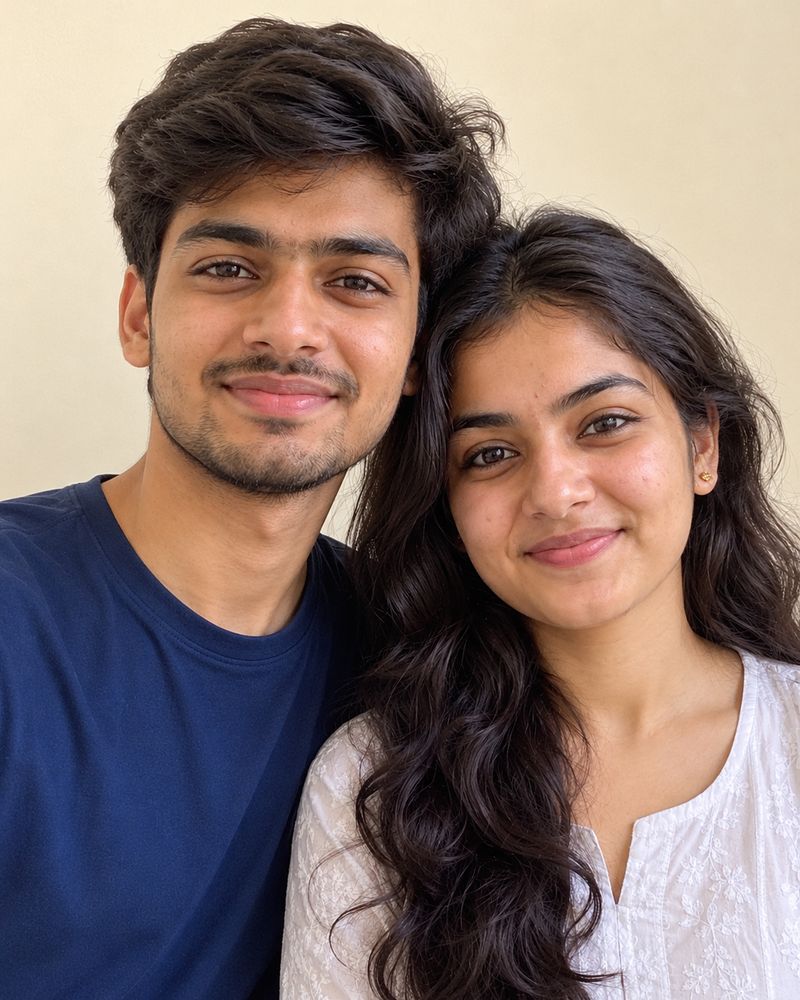
Copy this prompt
Upload your own clear photo in the AI app first, then paste the prompt. Results can differ a little between tools.
Prompt variations
Same idea, different scene. Each one has its own copy button.
Rainy umbrella
Beach sunset
On this page
What this look is and who it suits
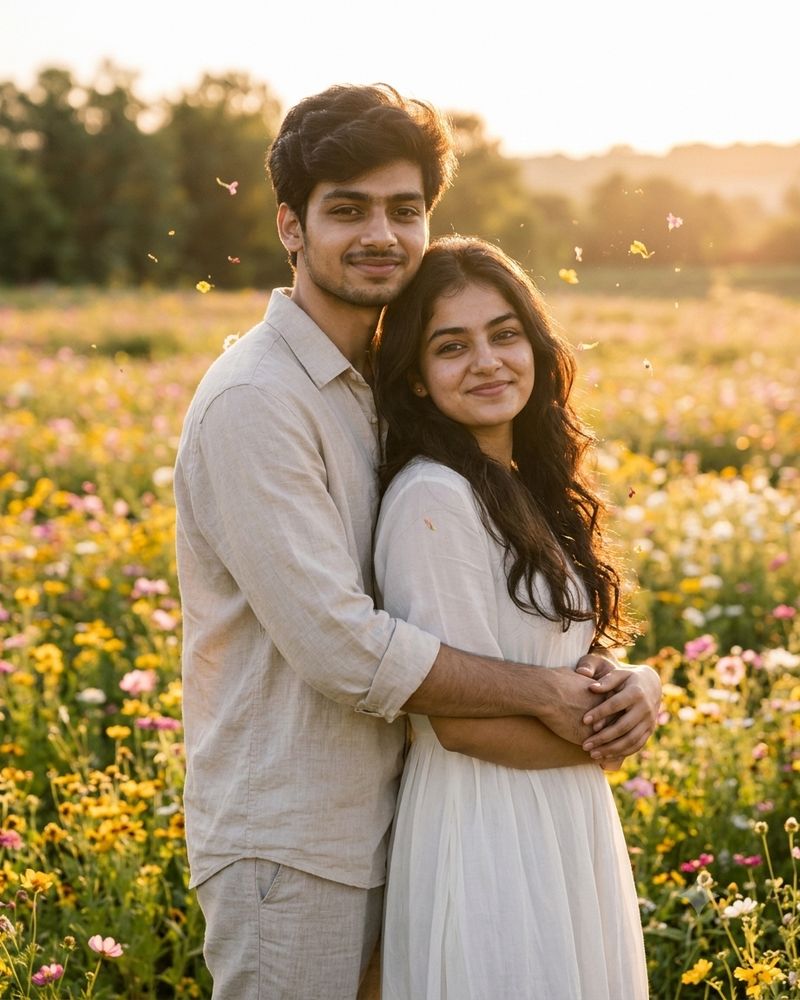
This couple Gemini prompt turns a normal photo of two people into a dreamy, romantic portrait. They stand close in a flower field at golden hour. She wears a flowing white dress and he wears a light beige linen shirt with trousers. He holds her gently from behind, both smile, and warm sunlight behind them makes a soft glowing edge on their hair. Flower petals float in the air and the background melts into pastel haze.
It is a good fit for married couples, engaged couples, boyfriends and girlfriends, and long-distance couples who want a picture together even when they are in different places. People use it for anniversaries, Valentine’s week, pre-wedding save-the-date posts and Instagram stories. Because the styling is soft and gentle, it also suits couples who prefer a simple, classic look and not a heavy party style.
The prompt asks the AI to keep both faces, skin tones and hairstyles the same, so the picture still looks like the two of you.
How to use this couple Gemini prompt
- Open Gemini on your phone or at gemini.google.com and sign in.
- Upload your couple photo with the plus icon.
- Paste the prompt from the box above.
- Send it and wait for the image. Check both faces first, then the hands and the pose.
- If one face is slightly off, reply: “Keep his face closer to the original photo, her face is perfect.”
- If the pose looks strange, reply: “Keep everything, but make them stand side by side with his arm around her shoulder.”
- Download the final image.
Gemini is good at warm backlight and soft haze, which this scene needs. If the faces look too dark because of the backlight, ask for “soft fill light on both faces”.
How to use it in ChatGPT
- Start a new chat and attach your couple photo.
- Paste the prompt and add: “Use the uploaded photo as the reference for both faces.”
- Wait up to a minute for the image.
- Ask for one change at a time. For example, “make the flowers yellow mustard flowers instead”.
ChatGPT tends to give very clean skin. Add “natural skin texture, realistic, not airbrushed” if the faces look plastic.
Photo tips for couple edits
- Both faces fully visible: No sunglasses, masks or hair covering the eyes. Open eyes on both.
- Same size in the frame: Stand shoulder to shoulder and the same distance from the camera.
- Close pose: A hug or a cheek-to-cheek pose gives the AI a clear idea of how close they stand. Distant, awkward poses make odd arms.
- Soft light: Window light or open shade is better than harsh sun. Avoid strong shadows on one face.
- Simple clothing in the original: Plain tops are easier to replace with the white dress and linen shirt than patterned or layered clothes.
- One clear photo: Do not upload a collage or a photo with a third person in it.
If you are in a long-distance relationship, edit each photo separately and ask for the other person to be added in a collage app. AI tools usually need both faces in the same photo to place them together properly.
How to customise the prompt
Keep the first two sentences about the faces, then change the scene.
- Outfits: “Pastel pink saree and cream kurta”, “deep red lehenga and ivory sherwani”, “denim jacket and a floral sundress”.
- Flowers and place: “Mustard field in Punjab”, “lavender field”, “tea garden hills in Munnar”, “cherry blossom path”.
- Light: “Soft pink sunrise” instead of golden hour.
- Mood: “Laughing candidly” instead of “smiling naturally”, for a fun feel.
- Pose: “Foreheads touching, eyes closed” for a quiet, intimate frame.
Example: replace “blooming flower field at golden hour” with “tea garden hills in morning mist” and “white dress” with “pastel green saree” for a South Indian feel.
The two variations
The rainy umbrella version puts the couple under a transparent umbrella on a wet city street at night. Street lights reflect on the road, and the mood is like a Bollywood poster. It works best when both people are smiling or laughing in the original. Check that the umbrella handle is held by someone and does not float.
The beach sunset version has them walking barefoot hand in hand while waves touch their feet. It is the most candid and relaxed of the three. Hands are the common weak spot here, so look closely at the fingers.
Common problems and fixes
The two faces blend together. Use a photo where the faces do not overlap. Add “two clearly separate people with distinct faces”.
One person looks like someone else. Name that person in a follow-up and ask for a closer match.
Extra or merged hands. Add “natural hands, five fingers each”. Or simplify the pose.
Dress or shirt looks wrong. Be specific: “knee-length white cotton dress, sleeveless”.
Backlight hides the faces. Add “faces clearly lit and sharp”.
Wrong shape. Add “vertical 4:5 portrait” to the prompt.
A note on responsible use
Only upload photos of people who agree to be edited. Photos of couples are personal, so avoid uploading anything you would not want stored by an AI app.
Frequently asked questions
Is this couple Gemini prompt free?
Yes. Copy it and use it as many times as you like. You only need Gemini or ChatGPT. Free image-edit limits depend on the app and may change, so check the app if an edit is not allowed.
What couple photo gives the best result?
A photo where both faces are clear, at a similar size, and neither is hidden by hair, hands or a cap. Standing close together and looking at the camera works better than a photo where one person looks away.
Can I use this prompt for a pre-wedding or anniversary photo?
Yes. It suits pre-wedding photos, anniversaries and Valentine's posts. For a wedding look, change the white dress and linen shirt to 'ivory lehenga' and 'cream sherwani', and keep the field and golden light.
One face looks good and the other changed. What should I do?
Reply in the same chat and name the person: 'Keep her face closer to the original photo, his is perfect.' Naming the person works better than a general complaint. Regenerating two or three times also helps.
Does the 'holding from behind' pose always work?
It is one of the harder poses. If the arms look odd, change the line to 'standing side by side with his arm around her shoulder', which is simpler for the AI to draw.